


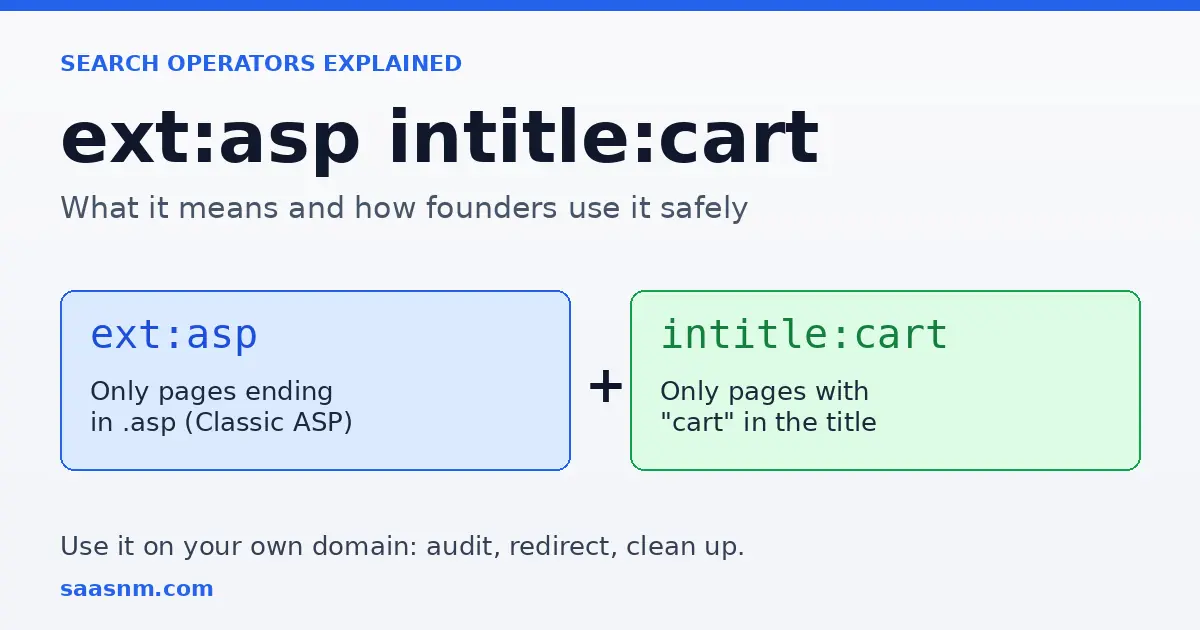
Quick answer: ext:asp intitle:cart is a Google search query that returns pages ending in .asp with “cart” in the title. Those are usually legacy shopping-cart pages built on Classic ASP. It is a research shortcut, not a hacking tool, and its best use for founders is auditing their own domain. Last reviewed October 21, 2026.
If you have landed here, you probably saw ext:asp intitle:cart in a list of search tricks, a forum thread or a security article and wondered what it actually does. This guide explains each part of the query in plain terms, shows what kind of pages it surfaces, and then covers something most explainers skip: how the same operators help SaaS and startup founders clean up their own sites and study competitors responsibly.
On October 21, 2026, I ran this exact query in Google with the location set to the United States and the language set to English. The first page was dominated by short explainer articles about the query itself, not by actual shopping-cart pages. That tells you what searchers want: they want the meaning, the safe uses and the limits. So that is what this article covers.
What does ext:asp intitle:cart mean?
Search operators are instructions you type into Google to filter results instead of matching words loosely. This query uses two of them, and each has one job.
| Part | What it does | In plain English |
|---|---|---|
ext:asp | Filters by file extension | Show only pages whose address ends in .asp |
intitle:cart | Requires a word in the title tag | Show only pages with “cart” in the title |
| Both together | Both filters apply at once | Legacy pages that look like shopping carts |
Two formatting rules matter. There must be no space between the operator and its value, so intitle:cart works while intitle: cart treats “cart” as an ordinary keyword. And the colon is part of the operator, which is why the shortened phrase “ext intitle” without colons is not a valid query.
Is ext: an official Google operator?
Not quite, and it is worth being precise here. Google’s help page, Refine web searches, documents filetype: as the operator for finding a particular file type. It does not list ext:. In practice ext: behaves as a shorthand and returns similar results, which is why I could run the query above. For anything you plan to document or share, use the documented form: filetype:asp intitle:cart.
Google has also changed which operators it supports over the years, and operator results are never guaranteed to be complete. Treat them as a quick way to sample what is indexed, not as a database you can query exhaustively.
What is a .asp page and why does it matter?
ASP stands for Active Server Pages, a Microsoft technology that runs code on a web server to build a page before sending it to the visitor. The original version is now called Classic ASP. Its successor, ASP.NET, uses different file extensions such as .aspx, so a .asp address generally points to an older site or an older section of a newer one.
Classic ASP is not dead, but it is no longer the default. Microsoft’s documentation notes that Classic ASP is not installed by default on IIS and has to be enabled as an optional component. Early online stores often used it, which explains why cart.asp and similar file names appear so often in older URLs.
What results does the query return?
When you run the query, expect a mixture of three things:
- Legacy store pages: older cart or basket pages still sitting on live domains.
- Documentation and tutorials: archived guides and vendor pages about building carts with Classic ASP.
- Forum threads: support posts from communities around older e-commerce products.
Results change constantly. Pages move, shops close and Google re-indexes, so a result you saw last month may be gone today. That is another reason not to treat the query as a source of facts about any particular business.
Safe variations you can use today
Once you understand the pattern, you can adapt it. These examples are intended for researching your own properties and public content.
| Query | What it finds | Best for |
|---|---|---|
site:yourdomain.com filetype:asp | Indexed .asp pages on your domain | Finding legacy pages after a migration |
site:yourdomain.com intitle:cart | Pages on your domain with “cart” in the title | Spotting duplicate or outdated checkout pages |
site:yourdomain.com inurl:cart | Cart-style URLs, including ones the title filter misses | A second pass for completeness |
filetype:asp intitle:cart -forum | Cart pages with forum threads excluded | Cleaner research on how legacy carts look |
site:competitor.com intitle:pricing | A rival’s indexed pricing pages | Competitive research |
A minus sign before a word excludes it, and quotation marks require an exact phrase. Start with one or two operators and add more only when the results are too broad.
How SaaS and startup founders can use these operators
This is where the query becomes useful for a business rather than a curiosity. The same logic applies whether you run a software product or an online store.
1. Audit your own site for leftover legacy pages
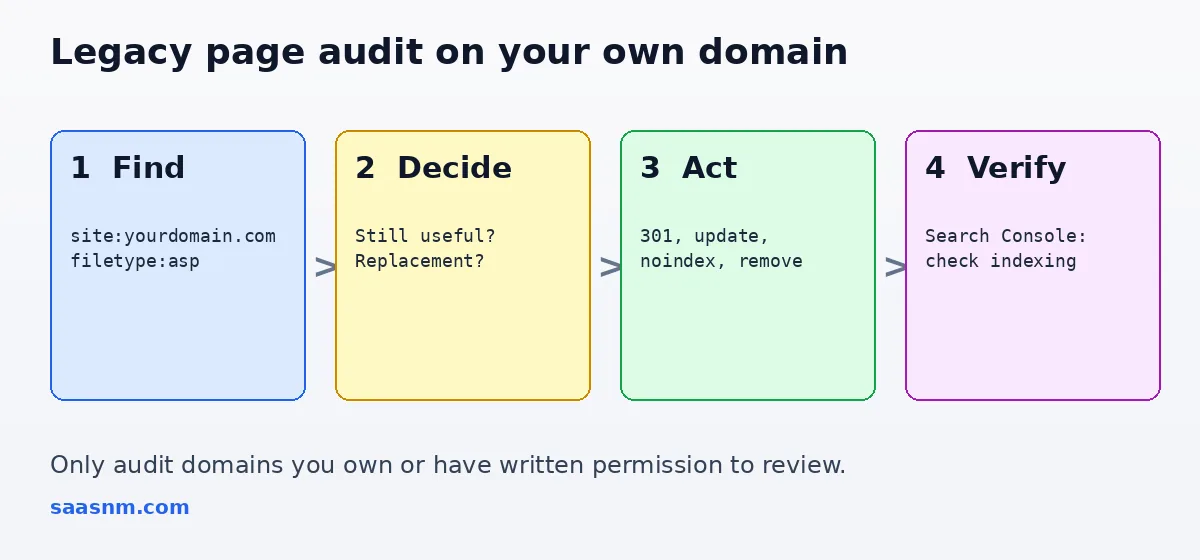
If your product grew out of an older website, you acquired a domain, or you migrated platforms, old pages can stay indexed long after you stopped thinking about them. Search site:yourdomain.com filetype:asp and review what appears. Old pages can show outdated pricing, broken checkout flows or confusing duplicates, and they can compete with your current pages in search.
For each page, choose one outcome: redirect it to the closest current page, update it, or remove it. Google’s guidance on permanent redirects says it follows them and treats the target as the page to show in results, and that you should use them only when you are sure the change is final.
2. Check for pages that should never have been public
The same method finds test pages, staging copies and internal tools that were indexed by accident. If something sensitive appears, take it offline or put it behind a login. Google’s documentation on removing information from Google explains that the Search Console Removals tool is temporary, lasting about six months, and that permanent removal means deleting or updating the content, password-protecting it, or adding a noindex tag. It also advises against relying on robots.txt to hide pages.
Only run these searches against domains you own or have written permission to review. Using operator queries to hunt for vulnerable sites that belong to other people is outside what this guide supports, and in many places it can create legal exposure.
3. Research competitors and market gaps
Operators are a free way to learn how a rival has built and maintained its site. Searching site:competitor.com intitle:pricing shows how many pricing-related pages are indexed, and comparing how many legacy or duplicate pages each competitor still has indexed is a quick signal of how well the site is maintained. If you are working with limited engineering time, our bootstrapped startup guide covers how to decide which fixes deserve that time first.
4. Spot migration opportunities
If you build or sell e-commerce, billing or migration software, the presence of Classic ASP carts is a market signal. Merchants running them often face old code that few developers know, security updates that arrive slowly, and checkout flows that were not designed for mobile. Those are real, solvable problems, but approach them as a vendor offering help, not as someone examining a specific shop’s weaknesses.
Should you keep a legacy ASP shopping cart?
A legacy cart is not automatically broken, and some run reliably for years. Still, they carry costs worth weighing before deciding to keep one:
- Security maintenance. Older code may lack modern protections, and any store that handles payments has to take card-data requirements seriously. The PCI Security Standards Council publishes the relevant standard.
- Talent. Fewer developers work with Classic ASP today, which tends to raise maintenance cost and slow changes.
- Customer experience. Older checkouts are often slow or awkward on phones, which can hurt conversion.
- Search clutter. A trail of old URLs can dilute your better pages.
If you operate one, plan a migration to a hosted e-commerce platform or a maintained framework, and map every old URL to its new equivalent so you keep the visibility those pages earned.
Common mistakes with search operators
- Adding a space after the colon.
intitle: cartdoes not behave likeintitle:cart. - Expecting a complete list. Google does not promise that operator results are exhaustive.
- Stacking too many operators. Start narrow, then widen.
- Treating results as current facts. An indexed page may be old, moved or already removed.
- Skipping verification. After you fix pages on your own site, confirm the change in Search Console instead of assuming it worked.
Responsible use: what this guide does and does not cover
Search operators are neutral. Journalists, SEO specialists, developers and site owners use them every day. Security researchers also use them, which is why this query appears in lists of so-called Google dorks. The line is authorization: reviewing what is publicly indexed about your own business is routine maintenance, while probing other people’s systems is not. If you find an exposed page on a site you do not own, the responsible step is to notify the owner, not to explore further.
Frequently asked questions
What does ext:asp intitle:cart mean in Google?
It combines two operators. ext:asp limits results to pages whose address ends in .asp, and intitle:cart requires the word “cart” in the page title. The usual result is a list of older shopping-cart pages built on Classic ASP.
Is ext: an official Google search operator?
Google’s own help page for refining searches documents filetype: but does not mention ext:. In practice ext: generally returns similar results, so use filetype:asp when you want the documented form.
What is the difference between ext:asp and ext:aspx?
The .asp extension usually indicates Classic ASP, the original Active Server Pages technology. The .aspx extension belongs to ASP.NET, its successor. They are different frameworks, so a query for one will not return pages from the other.
Is it legal to search for ext:asp intitle:cart?
Running a Google search is legal, and the query only reads what Google has already indexed publicly. What matters is how you use the results. Reviewing your own website is fine. Attempting to access, probe or exploit someone else’s system without permission is not, and this guide does not support it.
Can I use these operators on my own SaaS website?
Yes, and that is their most useful application for a founder. Add site:yourdomain.com to find legacy pages, duplicate cart or checkout URLs and forgotten test pages that are still indexed, then redirect, update or remove them.
How do I remove an old .asp page from Google?
Fix the page first: redirect it with a permanent redirect if a replacement exists, or remove the content or add a noindex tag if it should not appear. Google’s Removals tool only hides a URL temporarily, for about six months, so it should be paired with one of those permanent fixes.
Key takeaways
ext:asp intitle:cartfinds .asp pages with “cart” in the title, which usually means legacy shopping-cart pages.- Google documents
filetype:;ext:generally works the same way but is not listed on its help page. - The query is a research shortcut. Its highest-value use for a founder is auditing a domain you own.
- Fix legacy pages with permanent redirects, updates or noindex, and treat the Removals tool as a temporary measure.
- Only review properties you own or have permission to examine.
Sources: Google Search Help: Refine web searches; Google Search Central: Redirects and Google Search; Google Search Central: Remove information from Google; Microsoft Learn: Classic ASP not installed by default on IIS; PCI Security Standards Council.



